

How to use real-time information in Journey Planner
Journey Planner on the Transport Victoria website and PTV app includes real-time travel information to help you plan your trip with greater accuracy and visibility of disruptions.
What you can see in real time
Journey Planner displays live departure information for eligible services, including:
- Metropolitan trains, trams and buses
- V/Line trains
- Most buses in regional Victoria
This information helps you view live departure times while planning your journey.
How to identify real-time information
Journey results include icons and labels that show whether the information displayed is:
- Real-time (live) information
- Scheduled timetable information only
- Affected by delays or disruptions
You may see:
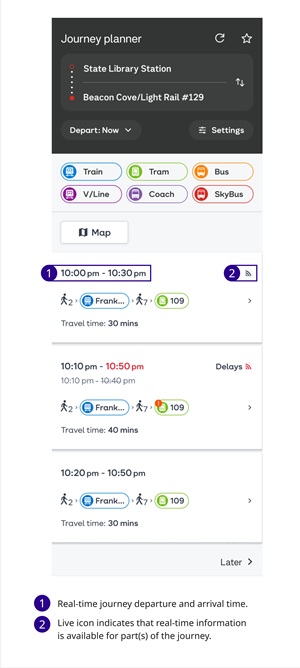
- A journey with live departure information and no delays:
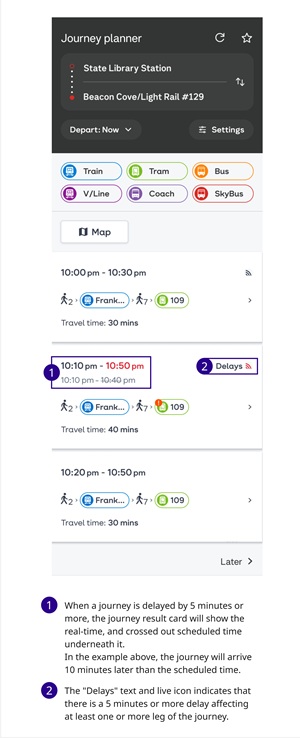
- A journey with live departure information and current delays:
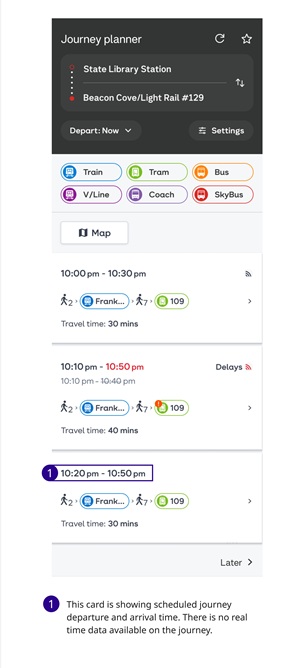
- A journey showing scheduled timetable information only where real-time data is unavailable:
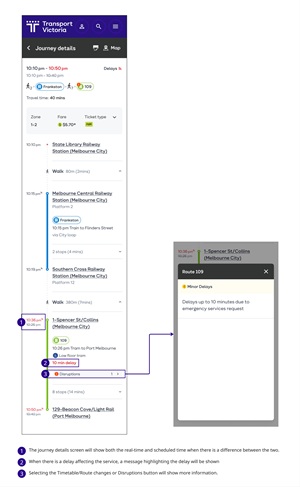
View journey details
Select a journey result to open the Journey Details screen. Journey Details may include:
- Updated departure and arrival times
- Delays or timetable changes
- Planned works and disruptions
- Platform or stop information
Understand disruption information
Disruptions are displayed throughout Journey Planner results and Journey Details to help you understand how service changes may affect your trip.
This can include:
- Planned works
- Delays
- Service alterations
- Replacement services
Services without real-time information
Some services and travel modes display scheduled timetable information only.
Real-time information is not currently available on Journey Planner for:
- SkyBus services
- V/Line coach services
- Replacement bus services
- Some regional bus services
- Walking, driving and cycling journey segments
How real-time information works
Real-time information shows within 60 minutes of the scheduled departure. time
Departure information generally becomes more accurate as the service approaches arrival or departure.